Post-Mortem: Tunnel Hazard
Inspiration
Game & Watch was a series of handheld single-title game units released in 1980 by Nintendo and produced for about a decade. These were basic early handhelds which each had a single game. I never had an actual Game & Watch (this was before my time, I started with a Game Boy Color), but I did have Game & Watch Gallery 2 for the aforementioned Game Body Color. This was a game cartridge released in 1998 which contained both updated and true-to-original versions of six of the classic Game & Watch games from the handhelds:
- Ball
- Chef
- Donkey Kong
- Parachute
- Vermin
and of course, Helmet.
Helmet is a game where the player avoids tools falling from the sky while collecting a point for each door reached. In the updated version, Mario (or Wario) also collects coins.
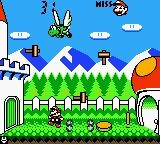
I played a LOT of this game in 1999-2000 and when thinking of an interesting small project to learn with, it popped back into my head over two decades later. So in late 2024 I set up a project and initially was just going to clone Helmet directly for practice, but then decided to create a full small game based off of the same core loop.
Planning & Development
I set up a repository and project tracking via GitHub Projects for simplicity and agility due to the small size. This project was about the largest that I would want to handle without the benefit of a better work item type hierarchy and so on. I've since moved to a self-hosted YouTrack instance as my projects increase in scope.
I worked in two-week cycles at a fairly easy pace throughout the ~2.5 months (counting the few weeks in late 2024 before it was shelved for a while). Time tracking was pretty loose but I estimate around forty-five hours of work from start to release.
Development was done in Godot 4.5 using VSCodium rather than the embedded editor. This was quite easy to set up and I very much prefer VSCode's layout / tabs and explorer setup. It also gives me a very convenient and simple VCS integration panel - almost all of my commits are done in this manner. I did try out the Godot VCS integration plugin but ran into some unfortunate tendency to crash often.
Art
All art was created by myself using Aseprite, which is an excellent piece of software and very reasonably priced.
Art has never been my strong suit. I'm the sort of person who can barely draw basic figures. So that was definitely a challenge coming in and part of the reason for sticking with a simple style. The very first sprite drawn (during the initial period a year before) was the player sprite - and it shows. The character is very basic with no shading and simplistic lines. I've opted not to use any art at all from other sources as a sort of forced practice and the improvement has actually been quite nice. While I would not consider myself a good artist by any means still, the skill progression from the first falling tool sprite and player character to some of the newer stuff is quite apparent.


At this point the character and a few other bits are long overdue for an overhaul, though I'm not sure if I will get to it in the planned updates.While unbalanced art quality can start to look pretty bad I haven't improved that much to where it's an issue.
Movement - Flaws and ‘Temporary’ Hacks
Slot-Based Movement
The original Helmet handheld game's movement consisted of a few preset positions that the character would simply teleport between (since the handheld did not actually move pixels around, just had preset positions for the character to appear in on the LCD). The GameBoy version did the same, but did animate movement between each of those positions. I emulated this for Tunnel Hazard by always moving the player between preset intervals equivalent to the background's tile size (64 pixels). These slots are also aligned to where loot items appear and to the paths of objects falling from the sky - to prevent the player from being able to safely stand in between object paths.
This system is Not Great.
Player movement is constrained to specific intervals and is bounded on either end by the doors (which are trigger areas for a somewhat hacky knockback system when closed). Movement progress is calculated each update call and the player snaps to the goal position if passing that space without an input being given to continue or reverse. A slight tap to the movement inputs results in moving all the way to the next position.
movement_progress += speed
if movement_progress >= 1:
    position = move_start_pos + Vector2(GameConstants.TILE_SIZE * movement, 0)
    movement_progress = 0
    set_state(PlayerState.IDLE)
    $RunningDust.emitting = false
    process_input()
position = move_start_pos + Vector2(GameConstants.TILE_SIZE * movement * movement_progress, 0)
Getting the player out of the door
I had a bit of a challenge when needing the player to walk through the left door (entrance) at the beginning of each stage, since the space between safely hidden and out past the doorway was more than a movement 'slot' or background tile. The temporary solution was to add a movement "lock" which would force the character to move two 'slots' to the right initially, then unlock. This lock status is checked every time movement passes the next 'slot' position and is disabled, providing a 2 * tile size movement just once when set. Every stage transition sets the player status to moving right, then enables the lock.
Does it work? Yes.
Is it good? Nope!
# Part of the movement code within _process
movement_progress += speed
if movement_progress >= 1:
       if lock_walk:
        lock_walk = false
        position = move_start_pos + Vector2(GameConstants.TILE_SIZE * movement, 0)
        movement_progress = 0
        move_start_pos = position
        return
    position = move_start_pos + Vector2(GameConstants.TILE_SIZE * movement, 0)
    movement_progress = 0
    set_state(PlayerState.IDLE)
    $RunningDust.emitting = false
    process_input()
    return
This temporary hack is still there in the 1.0 release. It generally works, but there are some odd behaviors that occur if the user attempts to move while “locked” which can sometimes show the character briefly moving in the wrong direction before resetting.
Better Approach
If I was starting anew, I would just drop the slot-based movement altogether for a much simpler free-form physics movement using collision checks at the boundaries. This is planned for full overhaul in the first post-release update. It doesn't really degrade anything as is much simpler - the pending changes for v1.1 use less than half as much movement code as the slot system.
Player State Machine - Flaws
I went with a very simple state machine implementation for the player early on, thinking that it was not worthwhile to set up a full 'proper' implementation since all he would do is move in two directions and stand still. Then came entering the stage...exiting....catching cats.... you see where this is going. More and more is duct-taped onto what was supposed to be "too simple to bother" implementing properly. As it stands the system is still workable but uses more if trees and match-cases than I am a fan of. I've decided that if I need even a single additional state, it will be refactored into a proper setup using state nodes to which the player character can delegate state-derived functionality.
# Constructs like this get difficult to keep track of, fast.
# This snippet only shows three of the eight states!

match state:
    PlayerState.LOCKED:
        $PlayerSprite.stop()
        $HatSprite.stop()
    PlayerState.IDLE:
        $PlayerSprite.play("idle")
        $HatSprite.play("idle")
        if has_cat:
            $CatPackSprite.visible = true
            $CatPackSprite.play("idle")
    PlayerState.WALK_LEFT:
        $PlayerSprite.flip_h = true
        $HatSprite.flip_h = true
        $PlayerSprite.play("walk")
        $HatSprite.play("walk")
        if has_cat:
            $CatPackSprite.visible = true
            $CatPackSprite.flip_h = true
            $CatPackSprite.play("walk")
One alternate approach would be to provide an implementation of each behavior tailored to each state as relevant. That's probably what I will go with, including a fallback to default behavior if the set state has no implementation.
Web Publishing Challenges
DirAccess vs ResourceLoader
This one was more straightforward and, in hindsight, pretty obvious. I had implemented dynamic texture assignment for certain objects (falling projectiles, pickup loot items) by preloading all of the textures from .png files then selecting one at random when the relevant scene is instantiated by the controller object. I did the same for .tscn files containing the stages. This worked great during testing, but failed immediately when I uploaded the first web build in the later stages of the project. Why? DirAccess.
# Original dynamic stage loading implementation
var stages_path: String = "res://Stage/"
var directory: DirAccess = DirAccess.open(stages_path)
directory.list_dir_begin()
var file: String = directory.get_next()
while file != "":
    if file.ends_with(".tscn"):
        stage_scenes.append(load(stages_path + file))
    file = directory.get_next()
directory.list_dir_end()
This fails because DirAccess isn't intended for the web, where the exporter shifts things around quite a bit. So none of the sprites or stages were loaded and I had a lot of missing textures. The solution was to swap to ResourceLoader, which is also simpler to use.
var stage_files: PackedStringArray = ResourceLoader.list_directory(STAGE_DIR_PATH)
for file in stage_files:
    if file.ends_with(".tscn"):
        stage_scenes.append(load(STAGE_DIR_PATH.path_join(file)))
Audio Issues
Web builds also ran into some audio issues. Sounds would either not loop as intended or not play at all. Eventually research into various forum threads and reddit posts led me to explicitly setting audio stream players to Stream instead of Sample, and reimporting all of my looping audio tracks with looping explicitly set in the import settings. For whatever reason, the looping checkbox in the AudioStreamPlayer node works fine on desktop but fails for me on web.
Other Odd Behavior
I also had some plain...weird... behavior in web builds which went away after enabling Threads in the export settings. So I've left that as-is and crossed my fingers for now.
Player Feedback
This is a small project with zero advertising, so the plays thus far have come from friends conscripted into testing it out. Taking the feedback as skewed positively because... well, friends... it's been good. A few bits of feedback have been tagged to future updates, such as the movement system rework. There are a few mechanic aspects that aren't quite clear enough as well which will be addressed. Input from other people is absolutely key because something like "you can only carry one cat" is obvious to me but not really clear from gameplay to someone who doesn't already know.
Plus, I have 100% five-star and totally unbiased reviews at the time of writing. So that's nice.
Outcome & Self-Evaluation
I'd say the project has been a success for its intended purpose. The planned mechanics were implemented, it plays reasonably well and there are no major issues that I'm aware of. I rate it a B+ when factoring in the experience level and time spent. This is now the second small game that I've managed to take from zero to complete and paves the way for moving to the next larger project once I finish its two planned updates.
Future Plans
From the midpoint of the project I had planned to scope this for a release followed by two further updates while I start work in parallel on my next project. While typing up this post, update one is halfway done and should be published by end of month. The high level roadmap is on the project page. The next project is in the prototyping stage and not fully decided yet.