Tunnel Hazard Devlog: 1.2 Update
Working on Update 1.2
Update two will bring a number of improvements to Tunnel Hazard, including more freedom of movement and a new mechanic. These are some of the changes that I have been working on part time for the past week or so.
Jumping!
Thanks to the state machine overhaul, jumping was as simple as a new state which begins by changing the player’s upward velocity on entry. I also allowed the player to change direction in mid-air, but added a lerp adjustment so that they could not just flip to maximum speed in the opposite direction instantly. Jumping reuses the walk animation’s first frame when moving side to side as it’s close enough.
func process_input() -> void:
  var x_dir: float = Input.get_axis("move_left", "move_right")
  if not is_zero_approx(x_dir):
    player.velocity = player.velocity.lerp(Vector2(x_dir * player.WALK_SPEED, player.velocity.y), FLYING_X_LERP)
    player.orient_to_left(x_dir < 0)
    player.main_sprite.animation = "walk"
There are no platforms or anything to jump to, but this is useful to hop up and catch a cat in mid-air or take the risk of moving diagonally through the air to escape a tricky set of falling tools.
UI Polish
As v1.2 is likely the last update on this small project, I also wanted to include some polish of the “little things” such as the UI elements.
Score and Stat Backgrounds
The scores and stats were displayed at the top of the screen as simple white text and in some cases could be hard to see, so I added a consistent background panel behind the text for better readability. This is just a flipped static sprite positioned behind the score labels, but it does the job.


Button Graphics
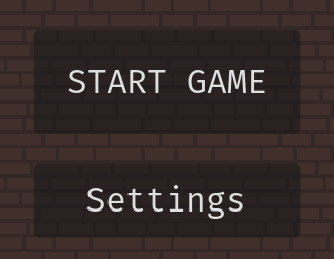
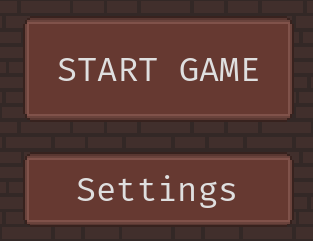
Until now the game has been using Godot’s button defaults, which are a decent enough semitransparent black box with white text. With the addition of the aforementioned score background textures, I opted to redo the buttons in the same style. This was super simple due to Godot’s built-in support for auto-resizing button graphics via StyleBoxTexture. All I had to do was create a simple generic button texture and then define the margins to indicate the center / expanding portion of the button versus the borders that should not be stretched in unexpected ways.
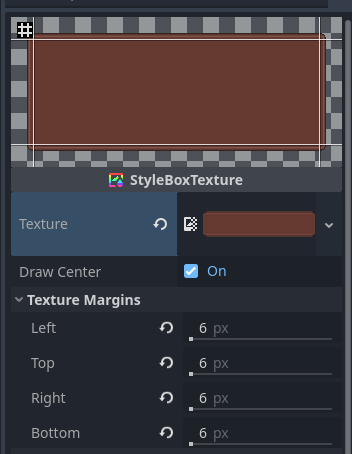
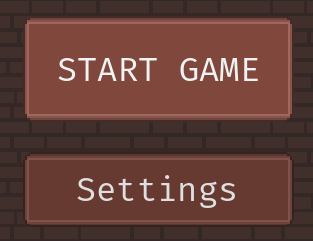
This is then applied to each button as a theme override. There is also a hover theme which is the same but has a lighter background.
A New Mechanic - Repairing Things
Repair zone scenes are pretty simple. They use an animated sprite to show the object (there are two variants) as well as a progress bar for player feedback and a timer to delay the breakage by a semi-random amount.
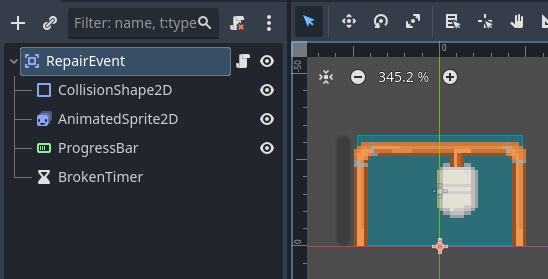
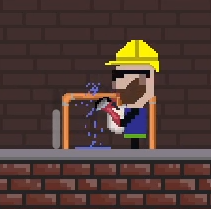
These scenes are placed in stages as if they were any other background object. Once added to the scene tree, the timer is triggered to change to broken state (which changes the sprite from the initial unbroken representation to one with leaking water or escaping steam). The Player has a new Repair state which checks if the Player object has a reference to a repair area (this is assigned and removed whenever he enters or leaves the RepairZone’s collision box). If so, he enters the repair state and starts the repair animation while calling the current zone’s repair() function every update tick.
Repair progress is stored as a float value from zero to one hundred. Upon reaching one hundred the repair zone changes the sprite to the “fixed” version while hiding the progress bar, turns off further repairs, and grants a score increase.
func repair(delta: float) -> void:
  if _repair_state == 0.0:
    _progress_bar.visible = true
  if _fixed:
    return
  _repair_state += _progress_per_second * delta
  _progress_bar.value = _repair_state
  if _repair_state >= 100.0:
    _fixed = true
    _change_to_fixed()

func _change_to_fixed() -> void:
  _sprite.play("fixed")
  _collider.set_deferred("disabled", true)
  _progress_bar.hide()
  GameManager.repair_score(REPAIR_SCORE_VALUE)
Multiple Cats
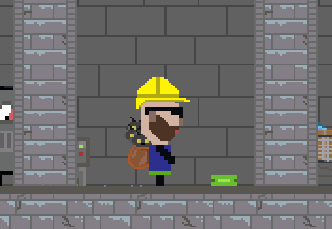
The cat saving mechanic has also been reworked to drop the “catch stance” requirement for simplicity, while also allowing the player to save multiple cats. Three cats will fall per stage now, and all can be caught as long as they have not yet hit the ground. The player’s animations also had to be updated - one to three cats are visible in the backpack from the side view depending on how many are being held. The idea here is to give the player more of a reason to stay in a room rather than rushing into the next one.
This update took a total of almost ten hours per my project tracking, over forty percent of which was spent on the state machine overhaul and related jumping ability - an inefficiency that could have been avoided by implementing the states more robustly from the start. It brings the total time spent on the game to approximately sixty hours. Of course with what I’ve learned and improved, I could do it again in half the time now!